nginxでDebian(wheezy)にプロキシサーバ立てる【nginx】【Debian】
目標
apacheで立ってるリバースプロキシをnginxに置き換える

記録
インストールから起動まで
otiai10 % apt-cache search nginx
collectd-core - statistics collection and monitoring daemon (core system)
fcgiwrap - simple server to run CGI applications over FastCGI
gitweb - fast, scalable, distributed revision control system (web interface)
gunicorn - Event-based HTTP/WSGI server
libplack-middleware-file-sass-perl - Sass and SCSS support for all Plack-based PSGI frameworks
nginx - small, powerful, scalable web/proxy server
nginx-common - small, powerful, scalable web/proxy server - common files
nginx-doc - small, powerful, scalable web/proxy server - documentation
nginx-extras - nginx web/proxy server (extended version)
nginx-extras-dbg - nginx web/proxy server (extended version) - debugging symbols
nginx-full - nginx web/proxy server (standard version)
nginx-full-dbg - nginx web/proxy server (standard version) - debugging symbols
nginx-light - nginx web/proxy server (basic version)
nginx-light-dbg - nginx web/proxy server (basic version) - debugging symbols
nginx-naxsi - nginx web/proxy server (version with naxsi)
nginx-naxsi-dbg - nginx web/proxy server (version with naxsi) - debugging symbols
nginx-naxsi-ui - nginx web/proxy server - naxsi configuration front-end
rt4-fcgi - External FastCGI support for request-tracker4
ruby-passenger - Rails and Rack support for Apache2 and Nginx
stud - scalable TLS unwrapping daemon
uwsgi-extra - fast, self-healing application container server (extra files)
otiai10 %
otiai10 % sudo apt-get install nginx
[sudo] password for otiai10:
Reading package lists... Done
Building dependency tree
Reading state information... Done
The following extra packages will be installed:
  libgd2-noxpm libxslt1.1 nginx-common nginx-full
Suggested packages:
  libgd-tools
The following NEW packages will be installed:
  libgd2-noxpm libxslt1.1 nginx nginx-common nginx-full
0 upgraded, 5 newly installed, 0 to remove and 0 not upgraded.
Need to get 1,053 kB of archives.
After this operation, 2,350 kB of additional disk space will be used.
Do you want to continue [Y/n]? y
Get:1 http://ftp.jp.debian.org/debian/ wheezy/main libgd2-noxpm amd64 2.0.36~rc1~dfsg-6.1 [229 kB]
Get:2 http://ftp.jp.debian.org/debian/ wheezy/main libxslt1.1 amd64 1.1.26-14.1 [254 kB]
Get:3 http://security.debian.org/ wheezy/updates/main nginx-common all 1.2.1-2.2+wheezy1 [73.1 kB]
Get:4 http://security.debian.org/ wheezy/updates/main nginx-full amd64 1.2.1-2.2+wheezy1 [435 kB]
Get:5 http://security.debian.org/ wheezy/updates/main nginx all 1.2.1-2.2+wheezy1 [61.2 kB]
Fetched 1,053 kB in 4s (226 kB/s)
Selecting previously unselected package libgd2-noxpm:amd64.
(Reading database ... 39260 files and directories currently installed.)
Unpacking libgd2-noxpm:amd64 (from .../libgd2-noxpm_2.0.36~rc1~dfsg-6.1_amd64.deb) ...
Selecting previously unselected package libxslt1.1:amd64.
Unpacking libxslt1.1:amd64 (from .../libxslt1.1_1.1.26-14.1_amd64.deb) ...
Selecting previously unselected package nginx-common.
Unpacking nginx-common (from .../nginx-common_1.2.1-2.2+wheezy1_all.deb) ...
Selecting previously unselected package nginx-full.
Unpacking nginx-full (from .../nginx-full_1.2.1-2.2+wheezy1_amd64.deb) ...
Selecting previously unselected package nginx.
Unpacking nginx (from .../nginx_1.2.1-2.2+wheezy1_all.deb) ...
Processing triggers for man-db ...
Setting up libgd2-noxpm:amd64 (2.0.36~rc1~dfsg-6.1) ...
Setting up libxslt1.1:amd64 (1.1.26-14.1) ...
Setting up nginx-common (1.2.1-2.2+wheezy1) ...
Setting up nginx-full (1.2.1-2.2+wheezy1) ...
Setting up nginx (1.2.1-2.2+wheezy1) ...
はいった?
otiai10 % tree /etc/nginx/
/etc/nginx/
├── conf.d
├── fastcgi_params
├── koi-utf
├── koi-win
├── mime.types
├── naxsi_core.rules
├── naxsi.rules
├── nginx.conf
├── proxy_params
├── scgi_params
├── sites-available
│   └── default
├── sites-enabled
│   └── default -> /etc/nginx/sites-available/default
├── uwsgi_params
└── win-utf

3 directories, 13 files
otiai10 % ls -la /etc/init.d | grep nginx
-rwxr-xr-x  1 root root 2235 Jul 13  2012 nginx
otiai10 %
うごかしてみる
otiai10 % sudo /etc/init.d/nginx start
Starting nginx: nginx: [emerg] bind() to 0.0.0.0:80 failed (98: Address already in use)
nginx: [emerg] bind() to 0.0.0.0:80 failed (98: Address already in use)
nginx: [emerg] bind() to 0.0.0.0:80 failed (98: Address already in use)
nginx: [emerg] bind() to 0.0.0.0:80 failed (98: Address already in use)
nginx: [emerg] bind() to 0.0.0.0:80 failed (98: Address already in use)
nginx: [emerg] still could not bind()
nginx.
otiai10 %
80ポートなのか。apache止めよう
otiai10 % sudo /etc/init.d/apache2 stop
[ ok ] Stopping web server: apache2 ... waiting ..
otiai10 % sudo /etc/init.d/nginx start
Starting nginx: nginx.
なんか起動めっちゃ早かった。で、ブラウザからアクセスする

動いた
リバースプロキシとして起動する
このへん参考 http://d.hatena.ne.jp/raugisu/20111215/1323957072
デフォルト設定を確認。
cat /etc/nginx/nginx.conf
user www-data;
worker_processes 4;
pid /var/run/nginx.pid;

events {
    worker_connections 768;
    # multi_accept on;
}

http {

    ##
    # Basic Settings
    ##

    sendfile on;
    tcp_nopush on;
    tcp_nodelay on;
    keepalive_timeout 65;
    types_hash_max_size 2048;
    # server_tokens off;

    # server_names_hash_bucket_size 64;
    # server_name_in_redirect off;

    include /etc/nginx/mime.types;
    default_type application/octet-stream;

    ##
    # Logging Settings
    ##

    access_log /var/log/nginx/access.log;
    error_log /var/log/nginx/error.log;

    ##
    # Gzip Settings
    ##

    gzip on;
    gzip_disable "msie6";

    # gzip_vary on;
    # gzip_proxied any;
    # gzip_comp_level 6;
    # gzip_buffers 16 8k;
    # gzip_http_version 1.1;
    # gzip_types text/plain text/css application/json application/x-javascript text/xml application/xml application/xml+rss text/javascript;

    ##
    # nginx-naxsi config
    ##
    # Uncomment it if you installed nginx-naxsi
    ##

    #include /etc/nginx/naxsi_core.rules;

    ##
    # nginx-passenger config
    ##
    # Uncomment it if you installed nginx-passenger
    ##

    #passenger_root /usr;
    #passenger_ruby /usr/bin/ruby;

    ##
    # Virtual Host Configs
    ##

    include /etc/nginx/conf.d/*.conf;
    include /etc/nginx/sites-enabled/*;
}


#mail {
#  # See sample authentication script at:
#  # http://wiki.nginx.org/ImapAuthenticateWithApachePhpScript
#
#  # auth_http localhost/auth.php;
#  # pop3_capabilities "TOP" "USER";
#  # imap_capabilities "IMAP4rev1" "UIDPLUS";
#
#  server {
#      listen     localhost:110;
#      protocol   pop3;
#      proxy      on;
#  }
#
#  server {
#      listen     localhost:143;
#      protocol   imap;
#      proxy      on;
#  }
#}
なるほど、apache2/apache2.conf以下apache2のconfと比べると簡潔でいい(のか知らんし。知ったかぶりです)。
/etc/apache2/conf.d/httpd.confは以下のとおりなので
<VirtualHost *:80>
    ServerName log-kcwidget.oti10.com
    ServerAdmin webmaster@log-kcwidget.oti10.com

    ProxyRequests off
    ProxyPass / http://oti10.com:7777/
    <Location />
        ProxyPassReverse http://log-kcwidget.oti10.com:7777/
        ProxyPassReverseCookieDomain localhost log-kcwidget.oti10.com
        ProxyPassReverseCookiePath / /
        Order allow,deny
        Allow from all
    </Location>
</VirtualHost>
これを/etc/nginx/nginx.confに移していく
diff -c5 ~/tmp/nginx.conf.originalbackup /etc/nginx/nginx.conf
*** /home/otiai10/tmp/nginx.conf.originalbackup  2013-10-08 13:48:24.481641001 +0900
--- /etc/nginx/nginx.conf 2013-10-08 13:46:28.685641001 +0900
***************
*** 24,33 ****
--- 24,41 ----
    # server_name_in_redirect off;

    include /etc/nginx/mime.types;
    default_type application/octet-stream;

+   server {
+       listen 80;
+       server_name log-kcwidget.oti10.com;
+       location / {
+           proxy_pass http://log-kcwidget.oti10.com:7777;
+       }
+   }
+
    ##
    # Logging Settings
    ##

    access_log /var/log/nginx/access.log;
で、restart
otiai10 % sudo /etc/init.d/nginx restart
Restarting nginx: nginx.
で、アクセスしてみる。
素でポート込みアクセス

サーバネームでアクセス
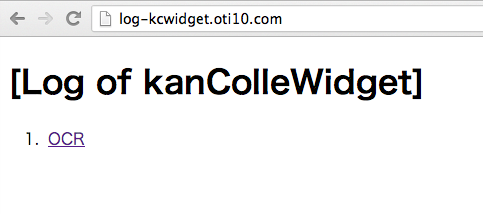
おおおお!
お手軽設定であった
DRY
